
Quiet Signal
At 7:30 a market risk manager has minutes to find the 2 desks that need a decision. The old monitor shows them at the same weight as 14 tiles and 51 open alerts. I redesigned it by subtraction, ran both versions on 1 dataset, and logged what each of 9 removals cost.
- Data visualization
- Dashboard redesign
- Risk limits
- Capital markets
- Information design
- Decision log
The loud dashboard
01 · Failure contextA risk-limits monitor tends to grow by addition. Every incident review adds a tile, every desk asks for its own colour, and every metric someone once needed stays on the first screen. The result is a view where every number is visible and none of them is ranked.
The cost lands before the open, when the only question is which desk needs a decision today. On the loud view that answer is on screen, but it sits as 1 gauge among 12, 1 tile among 14, and 1 row in a 360-cell heat grid, all at the same visual weight.
Quiet Signal asks what happens if the same numbers are kept and almost everything else is taken away, and it treats the list of removals as the design artifact rather than the final pixels.
- Role
- Product designer. I designed the morning decision hierarchy, desk drill-down, warning-policy controls, and live before-and-after comparison.
- Workflow
- Risk limits: identify the desk needing a decision before the open, then inspect its distance to the limit and supporting evidence.
- Data coverage
- 12 trading desks, 30 trading days, gross and net exposure, VaR, daily P&L, and 3 limit breaches.
- Verification
- Both views reconcile to 1 dataset. The comparison counts each first screen; the reader study in section 08 sets its pass line before any session.
- Related products
- Mercury makes financial position readable before detailed account inspection. Nasdaq Risk Platform monitors positions against limits. Quiet Signal combines a focused overview with a traceable desk decision.
Inspiration. Lee Feinberg’s idea of dashboards that persuade quietly, from a Data Visualization New York talk, applied to the risk and limits work that runs through my capital-markets projects.
Keep every number, rank them for the decision, and make the removals auditable. A quiet view is only trustworthy if a reader can see exactly what was taken off the first screen and where it went.
The 3 questions the morning read answers
02 · ScopeThe after view is scoped to what a risk manager has to settle before the open, in the order they settle it.
- Which desks need a decision today?
- How close is each desk to its limit, and which way is it moving?
- Has a limit been crossed in the last 30 trading days, and where?
Every other question the old monitor answered, from VaR to net exposure, is still answered in the after tool’s other 5 tabs.
The sentence is a traceable decision
Read the decision flow
- Gross exposure divided by the effective limit gives utilization
- The warning line selects desks
- Sort selected desks by utilization
- Name desks and 5-day movement
- Open the desk evidence
Same numbers, 2 tools
03 · The prototypesThe study is 3 working artifacts, built from 1 data file so no view can quietly disagree with another.
The before tool is a legacy limits monitor that works the way these tools do: a menu bar, a desk tree that filters every view, 14 KPI tiles, 6 tabs, a sortable 16-column grid in alphabetical order, an alert queue of 181 alerts with 51 still open, a trend chart with a crosshair, desk popups, reports, and CSV export. Every number is available, and none is ranked.
The after tool opens with 1 sentence built from 1 stated rule: 2 desks need a decision before the open, Rates EM at 97% of limit and Credit HY at 91%, both rising. Behind it sit 5 more tabs, each answering 1 question: all desks with distance to the line, desk detail, breaches with a near-miss toggle, the warning policy with a slider that rewrites every view, and a rule replay of what the headline said on each of the 30 days.
The comparison runs both tools at once under a wipe divider, or shows either one alone. The decision log is its main surface. Selecting an entry marks the region it changed inside both running tools, and a timed task lets you find the desks that need a decision in each tool yourself.
1 dataset, 2 working tools. Switch between wipe, before, and after, and step through the 9 decisions while both tools highlight what each one changed.
Authored inventory, counted from each first screen
These are not user outcomes. I designed both screens, and each tool counts its own tiles, charts, encoding colours, and sentences as drawn and reports them to the comparison, so the figures can be checked by opening it. The aim is fewer signals competing for the same glance, not a smaller number for its own sake. Whether that helps a reader is what section 08 tests.
The answer is on screen, at the same weight as 14 tiles, 12 gauges, and 12 trend lines.
The decision comes first, in words, and the chart shows distance to the line.
4 alert rules, all still firing: 181 alerts in 30 days for 2 desks that need a decision.
The 30-day line, VaR, stress, and positions return 1 click down, for 1 desk at a time.
What the headline said on every day, rebuilt from the same rule, so a reviewer can check it.
The decision log
04 · 9 subtractionsA before and after picture shows that something changed. The log shows what changed, in what order, and what each removal cost. Each entry names the trade-off I accepted, because a subtraction with no cost named is a taste call, not a design decision.
-
Cut 11 of 14 KPI tiles
VaR, P&L, headroom, and 8 more tiles left the first screen. 3 remain: desks over the warning line, breaches in 30 days, and firm-wide utilization.
Trade-off accepted: VaR and P&L are no longer readable at a glance. They moved to the Desks tab and the desk detail.
-
Replace 12 desk colours with 1 signal hue
Colour now carries 1 meaning: past the warning line. Every other bar is grey.
Trade-off accepted: desks lose their colour identity, so identity moves to the label, and a reader trained on the old legend has to relearn.
-
Write the headline as a sentence
The tool opens with the decision in words, before any chart.
Trade-off accepted: a sentence is an interpretation and can be wrong. It is built by 1 stated rule and quotes its numbers, and the rule replay shows what it would show on each day under the selected warning threshold.
-
Sort desks by utilization, not alphabetically
The desk that needs attention is always the top row.
Trade-off accepted: row positions change from day to day, so muscle memory for where a desk lives is gone.
-
Draw the limit, not only the value
The 90% warning line and the 100% limit are on every chart, so the reader sees distance to the line rather than a bare percentage.
Trade-off accepted: the warning policy is now part of the picture. The Limits and policy tab exists because the line will move, and moving it rewrites every view.
-
Replace 12 trend lines with a 5-day change
Each desk carries its 5-day move in points. The 30-day line lives in desk detail.
Trade-off accepted: the long-range shape is hidden from the first screen. A slow 30-day climb and a 5-day spike can print the same number.
-
Fold gross and net into utilization of limit
1 ratio per desk replaces 2 exposure figures and a headroom tile.
Trade-off accepted: net exposure leaves the first screen, so a heavily hedged desk looks the same as an unhedged one.
-
Show breaches as 3 dated marks, not a 360-cell grid
The heat grid became 1 timeline with the 3 days a limit was crossed.
Trade-off accepted: near-misses stay off the first screen. Equity Derivatives touched 99.4% in the window and appears only when the Breaches tab’s near-miss toggle is on.
-
Move everything else behind tabs
The alert queue, positions, grid, and reports became 5 tabs, each answering 1 question.
Trade-off accepted: an auditor or a quant now pays 1 click for the full picture. Nothing was deleted from the data.
Nothing was deleted
05 · Where the removed numbers wentSubtraction on a risk surface is only safe if the reader can reverse it. The after tool is tiered in 3 levels, glance, explain, and audit, and each number that left the first screen has a named tab to live in.
The morning view decides which desk to call. When a breach still happens, the review that explains it is its own workspace: What Moved First reads a stressed hour after the fact, with a direction check before any finding is recorded.
- Glance
- Morning read: the headline sentence, 3 tiles, distance to limit, and the breach strip. Enough to decide which desk to call first.
- Explain
- Desks, desk detail, and breaches: every desk with its line, 5-day change, and 30-day shape; VaR, stress, and positions per desk; the breach register and near-misses.
- Audit
- Rule replay and the full desk table: what the headline would show on each day under the selected warning rule, and every figure the old monitor showed, for all 12 desks.
- Policy
- Limits and policy: the rule in 1 paragraph, the warning line as a control with a live preview, and the limit change log.
- Accessible route
- Tabs and the divider work from the keyboard, state changes are announced, every chart carries a text description, and each chart has a table behind it.
Subtraction keeps an evidence route
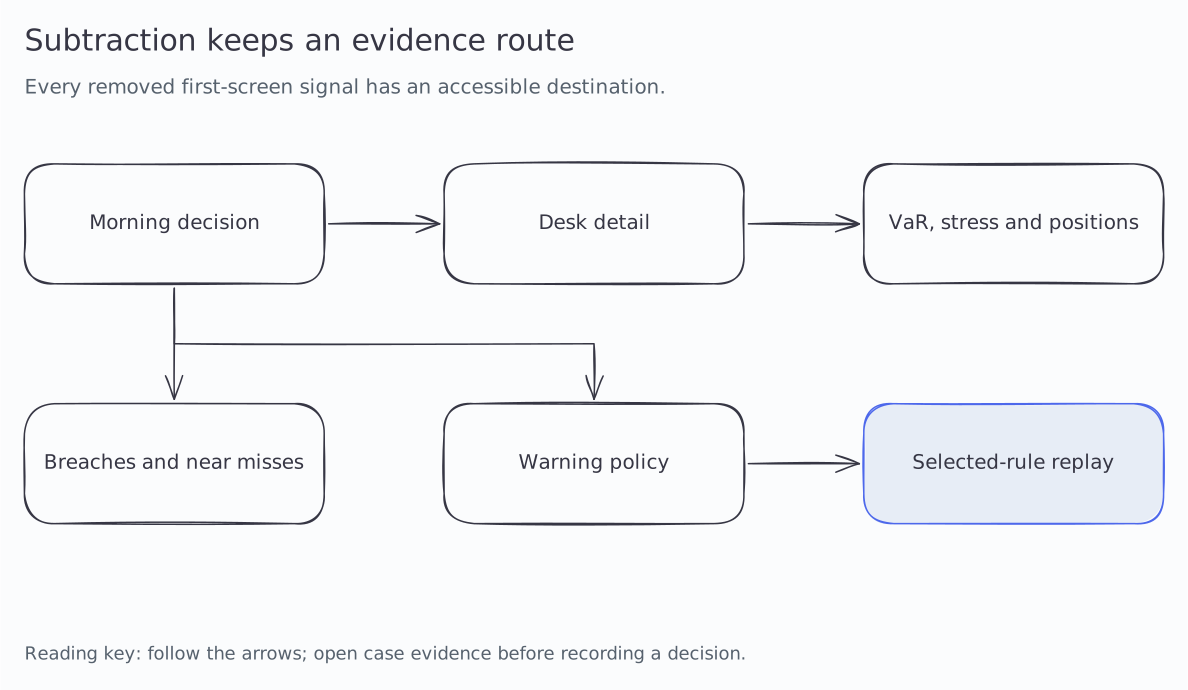
Read the decision flow
- Morning read names the attention decision
- Desk detail restores risk and position context
- Breaches retain dated history and near misses
- Policy controls expose the warning rule
- Replay shows the result under the selected rule
Who reads the morning view
06 · AudienceA quieter view changes the work of everyone downstream of it, not only the person looking at it first.
- Head of trading
- Needs to know which desk to call before the open, and why.
- Chief risk officer
- Needs the firm-wide picture and confidence that nothing is hidden by the summary.
- Risk operations
- Need the full table to reconcile limits and prepare the breach report.
- Traders
- Need to see their own distance to the line without reading 11 other desks.
- Audit and model risk
- Need a record of what the dashboard chose to foreground, and the rule it used.
Trade-offs
07 · What was given up3 choices shaped the study more than any single removal.
- Ranking over completeness
- The after view ranks desks for 1 decision. A reader with a different question, such as which desk is most hedged, gets less from the first screen than before.
- A sentence over a neutral view
- Writing the headline makes the dashboard take a position. That is the point, and it is also a new failure mode, so the sentence only quotes numbers that the chart directly under it shows.
- 1 dataset over 2 builds
- All 3 artifacts are built from 1 data file. It made the legacy tool harder to fake, and it means no removal can hide a changed number.
On North Bridge, a coverage lead told me partners read dense screens daily and that a sparse surface reads as not serious. A risk desk may react the same way. That is why the full desk table stays 1 click away and why the study below includes desk heads, not only analysts. If the quiet view costs trust, the density comes back.
What I would measure
08 · The study this needsThe tools make an argument. They do not yet have evidence from users. This is the study I would run before calling the after tool better, with the pass line set before any session.
- Participants
- 5 to 8 people who read a limits monitor every morning: desk heads, risk managers, and risk operations analysts.
- Task
- Open every desk that needs a decision today. Each person uses both tools on 2 different trading days, day 30 and day 17, with tool and day order counterbalanced. Both tools can open on any study day, so no one sees the same answer twice.
- Measures
- Time to the last correct desk, desks missed, desks opened in error, and stated confidence on a 5-point scale.
- Pass line
- The after tool earns its place only if it is faster with no additional misses. If readers miss a near-miss desk more often, entry 8 in the log is reversed and near-misses return to the first screen.
The comparison’s timed task runs this protocol on 1 reader. It times the search in each tool on 2 different trading days with different answers, counts desks found and opened in error, and swaps the days on the next attempt. You still learn the task on the first run, so it is there to make the study concrete, not to produce a number for this page.
What the model establishes
Threshold flags are driven by current utilization, not by the rising trend alone. The same-day historical view reads stored daily gross limits, net exposure, stress and positions; it truncates all series at the selected day. Rule replay recomputes past headlines under the selected warning threshold; it is not a stored audit of historical rules. User sessions in the evaluation protocol have not been run.
How it is built
09 · Stack and craft- 3 single-file HTML artifacts with vanilla JavaScript and hand-built SVG. No framework, no chart library, no network calls.
- 1 seeded data file feeds all 3 through a small build step, so the before tool, the after tool, and the comparison can never disagree about a number.
- Both tools can open on any trading day. A snapshot cuts every series at that day and recomputes its figures, so a study session never shows a number from the future.
- The comparison drives both tools over postMessage: highlight a decision, reset, report first-screen counts, and record which desks a reader opens. It works from disk as well as from a server.
- The before tool is a desktop tool that does not reflow, the way the original would not. The after tool is responsive down to phone width.
- Keyboard-operable tabs, divider, and view switch, announced state changes, text descriptions on every chart, table fallbacks, and prefers-reduced-motion. Built to a WCAG 2.1 AA target, not audited.
- Diagram sources: editable Excalidraw files with SVG and PNG exports.