
Tail Mass
A risk committee meets about the 2% of days that went badly. Widen the tail bins to make those days visible and they take up almost 9 times the area they earned. I designed a distribution reader that draws the same 2,520 days 3 ways and computes how much of each picture sits in the wrong place.
- Data visualization
- Statistical graphics
- Market risk
- Capital markets
- Explorable explanation
- Information design
The histogram nobody checks
01 · Failure contextA return histogram is the first chart in most risk packs, and it is read by area. A reader looks at how much of the picture sits left of a loss and takes that as how often the loss happened. That reading is correct only while every bar is as wide as every other.
With equal widths the tails are honest but illegible. On the 10-year series in this study, 16 bins inside the data are empty and 9 more, holding 23 days, draw under 1% of the tallest bar. The crash days are there and look like nothing.
The usual repair is to widen the tail bins so they show up. Most charting defaults keep height equal to the count when they do, so a bin 11 times as wide draws 11 times the area its days earn. Below a 3% loss the data holds 48 of 2,520 days, 1.90%. The widened chart gives that range 16.76% of its area. Nothing on the chart says so.
- Role
- Product designer. I designed the distribution comparison, linked range inspection, bin-area diagnostic, and estimate-before-reveal task.
- Workflow
- Market-risk reporting: inspect whether a chart represents tail probability faithfully and distinguish visual area from exact observations.
- Data coverage
- 2,520 trading days of daily returns for a equity desk, with fat tails and volatility that clusters after losses. The worst day is −13.98% and the 1-day 99% VaR is −3.93%.
- Verification
- The shared core checks bins, range shares, and unchanged risk summaries. The reading protocol compares estimation error across encodings.
- Related products
- PortfolioPilot exposes downside-risk and diversification factors. MSCI RiskManager evaluates VaR and expected shortfall. Tail Mass makes the probability encoded by a chart independently checkable.
Inspiration. Kaiser Fung’s talk on varying-width histograms at Data Visualization New York, 14 March 2024, applied to the market-risk charts that run through my capital-markets work. The density rule is textbook statistics. The instrument around it is the work.
In a histogram the area is the claim. When a bin gets wider its bar has to get shorter by the same factor, and the reader should be able to check that the picture and the data agree without doing the division.
The 3 questions a tail chart has to answer
02 · ScopeThe instrument is scoped to what a risk reader asks of a return distribution, in the order they ask it.
- How much of the history sits beyond a loss I care about?
- Where does the 99% VaR line cut, and how bad are the days past it?
- Does what I see on the chart match what the days say?
Most tools answer the first 2 and leave the third to trust. The third is the one this study is about, so the instrument answers it on every screen.
Width changes the meaning of height
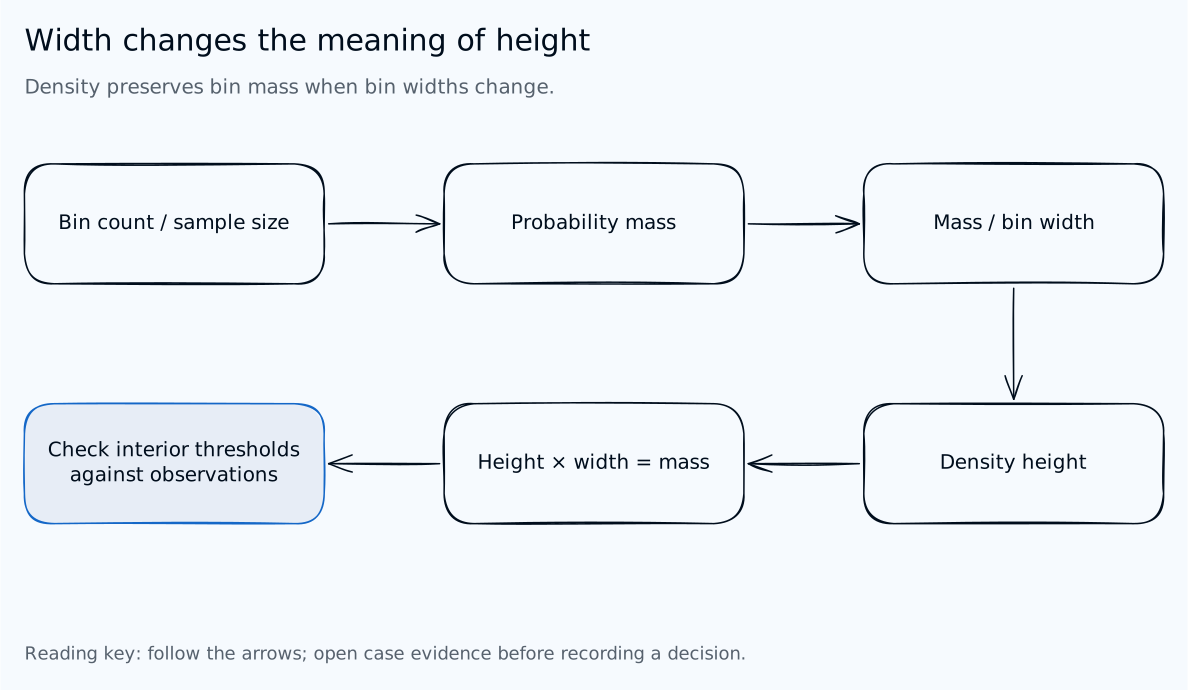
Read the decision flow
- Count observations in a bin
- Count divided by sample size gives probability mass
- Divide mass by bin width for density height
- Height times width recovers the mass
- Inspect exact observations when a threshold cuts a bin
Same days, 3 pictures
03 · The instrumentThe instrument draws 1 dataset in 3 encodings on 1 horizontal scale. A uses equal widths with height equal to days. B widens the tails and keeps height equal to days, the common mistake. C widens the tails and divides height by width, so each bar’s area equals its share of days.
Every view carries a computed bin-area error: the share of the drawn area that sits over returns it does not belong to. At the default settings it reads 0.0% for A, 19.3% for B, and 0.0% for C. Drag across any chart to set a range and the instrument reports the share of days in it against the share of that picture’s area, for all 3 encodings at once.
4 views sit behind tabs. Explore works 1 encoding at a time with a bin inspector and a risk card. Compare all 3 stacks them. Read it cold asks you to estimate a tail share from 3 unlabelled charts before it names the encoding. Method states every rule and shows the bins as a table.
Under the histogram, an exact cumulative curve drawn from the daily returns gives a second route to the same answer, so a tail cut inside a wide bin can be checked against the days.
1 dataset, 3 rules for bar height. Change the window, the core bin width, and where the tails start, and watch which picture keeps its area honest.
Computed by the instrument, at its default settings
These are properties of the charts, not reader outcomes. The instrument computes each one from the days and the bins as drawn, so any of them can be checked by opening it and changing a setting. Whether the honest encoding helps a person read the tail is what section 08 would test.
47 days, 1.87% of the history, drawn as 16.41% of the picture. The bar looks reasonable. The inspector is what shows it is not.
Divided by width, the bar is honest and nearly flat. The lens makes it visible without redrawing its area: it is an outline, labelled, and off by default.
The encoding is named only after the estimate is locked, so you read each chart the way a committee would: cold.
The bin table shows the cost of B on both sides. Its tails are over-drawn, so every core bin is under-drawn by the same total.
The decision log
04 · 7 encoding decisionsThe right formula fits on 1 line. The design work is everything a reader needs in order to trust it, and each choice below names what it cost.
-
Divide height by width, and say so in the axis label
The vertical axis in C reads “% of days per 1-point width”, not “frequency”.
Trade-off accepted: the axis no longer reads as a count, and it is a unit most readers have never seen. The inspector gives days back for any bar.
-
Keep the wrong encoding runnable
B stays in the instrument, next to A and C, on the same scale, with the same range.
Trade-off accepted: a screenshot of B could be lifted out of context. Its title names the rule, and its note states its own error in the error colour.
-
Print the bin-area error on every view
1 computed figure per encoding: how much of the drawn area sits over the wrong returns.
Trade-off accepted: it is a new statistic a reader has to learn. It is defined in 1 sentence on the Method tab, and its best value, 0, is easy to remember.
-
Widen tails beyond a stated quantile, not by eye
Tail bins start at the 2.5% quantile, snapped outward to the core grid, and the cut is a control.
Trade-off accepted: tail edges are no longer round numbers, and they move when the window changes. The bin table prints every edge.
-
Admit what a wide bin cannot say
When a range ends inside a wide bin, the range card says so and names the bin.
Trade-off accepted: the honest encoding sometimes shows a gap. Set the tail cut to 5% and C reports 3.15% below −3% against 1.90% in the data, because a bar knows how many days it holds but not where.
-
Make the tails legible with a labelled lens, not a taller bar
An optional outline draws C’s tail bars at 10 times their height, marked 10x.
Trade-off accepted: the lens is a second vertical scale on 1 chart, which is exactly the kind of device that misleads. It is off by default, drawn as an outline rather than a fill, and only available on C.
-
Compute risk from the days, never from the bars
VaR, expected shortfall, and the worst day come from the returns, so they are identical in all 3 encodings.
Trade-off accepted: the VaR line can land inside a wide bin and look like it disagrees with the bar under it. The risk card says the figures do not depend on the bars.
One history, 2 calculation paths
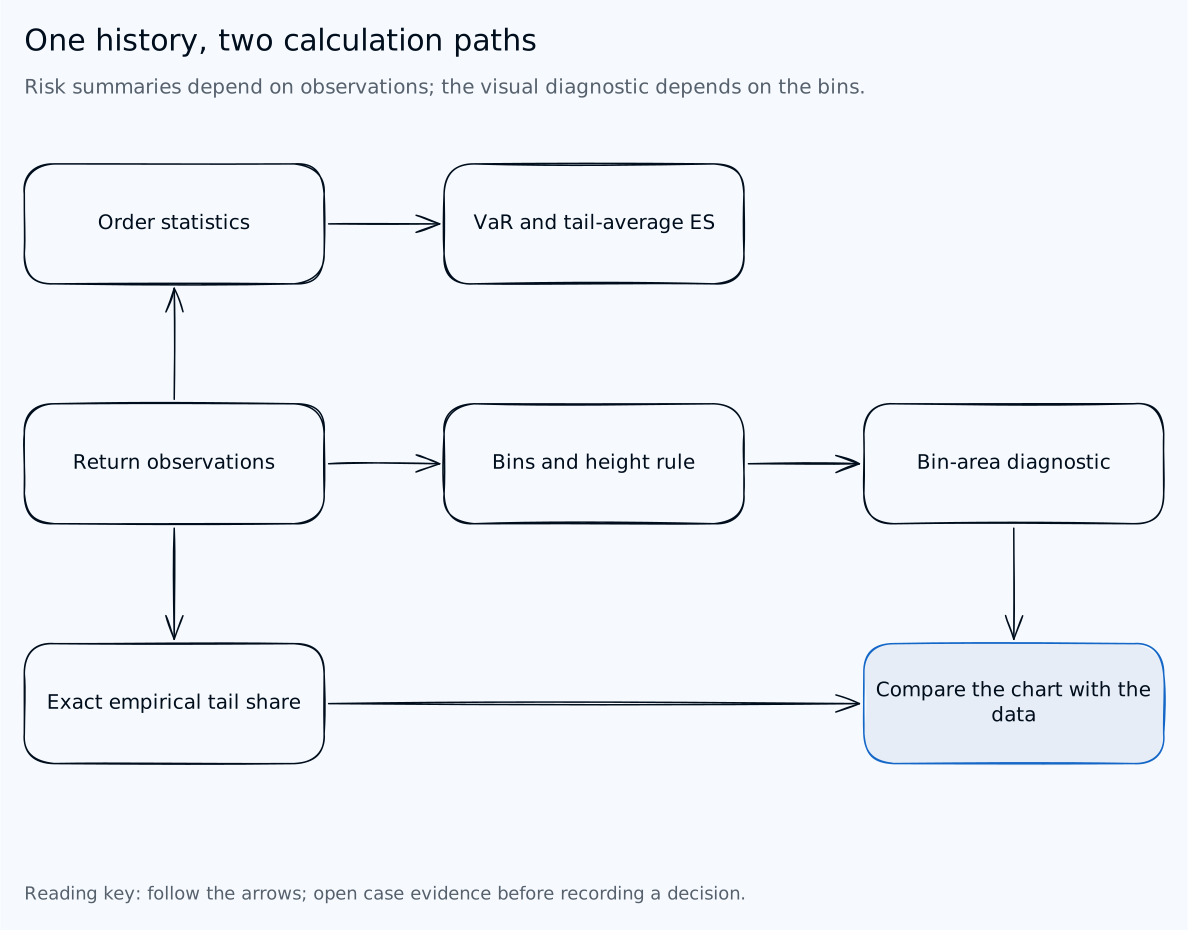
Read the decision flow
- Sort observations for VaR and tail-average ES
- Choose bins for chart encoding
- Compare drawn bin area with observed bin mass
- Compare exact tail share with the histogram approximation
- Changing bins does not change the observation-based risk values
Where this transfers
05 · Same failure, other fieldsAny distribution with a thin, expensive tail invites wider tail bins, and any tool that keeps height equal to count after widening them will overstate the rare case. The companion study, Same Rate, Different Weather, makes the same argument for yield: 5 pools share 1 average, and only the distribution and its history show which one a 30-day holder would live through.
- Market and credit risk
- Return, P&L, and loss-given-default histograms in risk packs and model validation reports.
- Insurance
- Claim-size distributions, where the largest claims are few and carry most of the cost.
- Service reliability
- Latency histograms with log-spaced buckets, read at p99, where a wide slow bucket can look like a crowd.
- Model monitoring
- Score and residual distributions in AI evaluation dashboards, where the failures sit in the tails a summary chart compresses.
Who reads a tail chart
06 · AudienceThe person who draws the histogram is rarely the person who acts on it.
- Risk committee
- Needs to know how often the bad days happen and how bad they get, from 1 glance at a slide.
- Risk managers
- Need to see where VaR cuts and what sits past it, in the window that matters today.
- Analysts who build the pack
- Need a default that stays honest when they change the bins to make the tail visible.
- Quants
- Need the bin edges, the counts, and the rule, so they can reproduce the picture.
- Model risk and audit
- Need a way to check that a chart in a report does not overstate or hide the tail it is about.
Trade-offs
07 · What was given up3 choices shaped the instrument more than any single control.
- Honest area over familiar units
- C is correct, and its vertical axis is a unit a committee has not been trained to read. A counts-based chart is wrong in B’s way or faint in A’s way, but it feels normal.
- A synthetic series over a real one
- A fixed seed means the page can be published, rerun, and checked number for number. It also means the crash in Year 7 is modelled, not remembered.
- An instrument over a single corrected chart
- Shipping only C would have been simpler. The argument needs the wrong picture next to the right one, with the gap stated as a number, or the reader has to take the formula on trust.
Density heights are right and faint. A reader who sees a nearly flat tail in C may conclude the tail is small, which is the same false confidence the study sets out to remove. If the study shows that, the fix is not a taller bar. It is leading with the range readout, the number, and letting the chart support it.
What I would measure
08 · The study this needsThe instrument shows that only B puts area in the wrong place: A keeps it right by leaving the tails as slivers, C by drawing them wide and faint. It does not show that people read the honest one better. This is the study I would run first, with the pass line set before any session.
- Participants
- 8 to 12 people who read return distributions for decisions: risk managers, analysts who build risk packs, and committee members.
- Task
- Estimate the share of days below a stated loss from an unlabelled chart. Each person reads all 3 encodings, each on a different window, with encoding and window order counterbalanced.
- Measures
- Absolute estimation error in points, whether the estimate lands nearer the data or nearer the picture’s area, time to answer, and stated confidence on a 5-point scale.
- Pass line
- C earns the default only if its median error is lower than B’s and no worse than A’s. If readers underestimate the tail on C, decision 6 changes and the lens is on by default.
Read it cold runs this protocol on 1 reader: 3 charts, 3 encodings, 3 windows, a new order on each attempt, and a table of your estimates against the data and against each picture’s area. It is there to make the study concrete, and it records nothing.
What the model establishes
Bin-area error is half the sum, in percent, of the gaps between each bin’s share of drawn area and its share of days (the total variation distance). A zero value checks bin mass, not accuracy within a bin or how well someone reads the chart. Empirical interval counts and the cumulative staircase use the original daily observations. Changing the encoding leaves those counts, interpolated quantiles, and expected shortfall unchanged.
How it is built
09 · Stack and craft- 1 single-file HTML instrument with vanilla JavaScript and hand-built SVG. No framework, no chart library, no network calls.
- A seeded generator writes the same 2,520 days on every load: a GARCH-style variance that rises after losses, with Student t shocks for fat tails. The same core file drives the tool and the checks that produce the figures on this page.
- Binning, the bin-area error, range shares, VaR, and expected shortfall are computed live from the window in view. No number is typed in.
- Every state is a link: tab, window, encoding, bin width, tail cut, range, and lens are written to the address, so a figure on this page opens the exact view it shows.
- Keyboard-operable tabs and bins, a typed range as an alternative to dragging, announced state changes, a text description on every chart, and a bin table behind it. Built to a WCAG 2.1 AA target, not audited.
- Responsive from 375px to a wide desktop, with no horizontal page scroll at any width.
- Diagram sources: editable Excalidraw files with SVG and PNG exports.